| Author |
Topic:
Home Theater Guru's, HALP!!
[Locked] |
|
|
Date Posted:
1/1/00 12:00am
Subject:
Home Theater Guru's, HALP!!
|
It is better to run the inputs into the Rx and let it feed the video to the TV with a HDMI cable. It will depend on your Rx's age but there should be enough HDMI and/or cable inputs. I was able to connect everything, even the Xbox with HDMI. My older system did not have enough HDMI connections so I used a switch to connect the less used stuff. I would have to look at your Rx to be sure how best to set it up.
-----signature-----
There are three kind of liberals;
Stupid, ignorant or evil
The result is always evil but the intent is not always evil. Not that it makes much difference in the long run.
No one here is exactly as they seem. - G'Kar
|
Kjarhall
 Title: The Pungent One
Posts:
Title: The Pungent One
Posts: 915
Registered: 2002-3-1 15:47:21
|
Date Posted:
1/1/00 12:00am
Subject:
Home Theater Guru's, HALP!!
|
Koneg posted:
Altra_Shadowstalker posted:
My sources are my laptop (one HDMI slot, so that goes to the TV) and the Xbox, which is old and only has the component.
Then your audio sources are the Xbox and the laptop - not the TV.
Laptop to receiver via HDMI, Xbox to receiver via component or more likely RCA (does XBox have optical?) Edit: And as far as I know you can't daisy-chain the HDMI through the TV to the receiver.
Edit Edit: Apparently you can, but it would appear that you have to connect from the laptop to the receiver and then to the TV. If your receiver has multiple HDMI you should be able to do it? Maybe?
Both my old white Xbox and my new black Xbox had optical. It's what i used for a bit due to lack of enough HDMI inputs on my receiver.
Until i got, THIS!
Best piece of electronics i've ever owned, it's dreamy. 
-----signature-----
You're a crazy moron*
*http://vnboards.ign.com/outpost/b22180/115147923/r115151508/
hah! true story tho i'm a woman an i even love boobs..how can you not??- HallowEve
|
|
|
Date Posted:
1/1/00 12:00am
Subject:
Home Theater Guru's, HALP!!
|
THANK YOU GUYS! For some reason I didn't try it before (considering its the first thing I thought of), but the laptop to the receiver via HDMI video in, to the tv via video out worked. The only thing I can think of is I probably retired doing it with the xbox component cables which didn't work and figured I tried it with the laptop. I probably wouldn't have tried "again" if what you guys were saying didn't sound so right.
My man cave is complete! Now I'm going to work on upgrading the xbox or its capabilities.
-----signature-----
"Goddammit, Swearengen, I don't trust you as far as I could th'ow you, but I enjoy the way you lie."
I don't typo often, but when I do, I blame Swype.
|
Mastara
 Posts:
 1,446
Registered: 2004-12-29 22:52:21
|
Date Posted:
1/1/00 12:00am
Subject:
Home Theater Guru's, HALP!!
|
Unless your tv has an hdmi out and most dont, it wont work. Use either digital audio(orange plug)/rca or component audio/optical audio from the tv out to the receiver. All components run video and audio (depending on how you want it from the component (cable/satellite/dvd/blu ray boxes) to your receiver (if it passes video AND audio) then use 1 hdmi from the receiver to the tv. Less wiring and changing of inputs on the tv, only need to change the video input on the receiver.
-----signature-----
Boooooommmm Heeeaaaddddshhhhooooottttt!
http://www.carellaross.com/img/truth_its_the_new_hate_speech.jpg
Mastatheimposta - 10L2 SB Merlin
|
|
|
Date Posted:
1/1/00 12:00am
Subject:
Home Theater Guru's, HALP!!
|
optical audio out to optical audio in
optical > copper
unless your name is uverse in which case pony express > optical
-----signature-----
Jesus? No, but there is indeed a god shaped hole in the heart of man, why is yours so empty? -- snarf igraine
the original monotheism: http://en.wikipedia.org/wiki/Phallus
|
Mangler_X
Posts: 49
Registered: 2002-6-2 17:56:00
|
Date Posted:
1/1/00 12:00am
Subject:
Home Theater Guru's, HALP!!
|
Kjarhall posted:
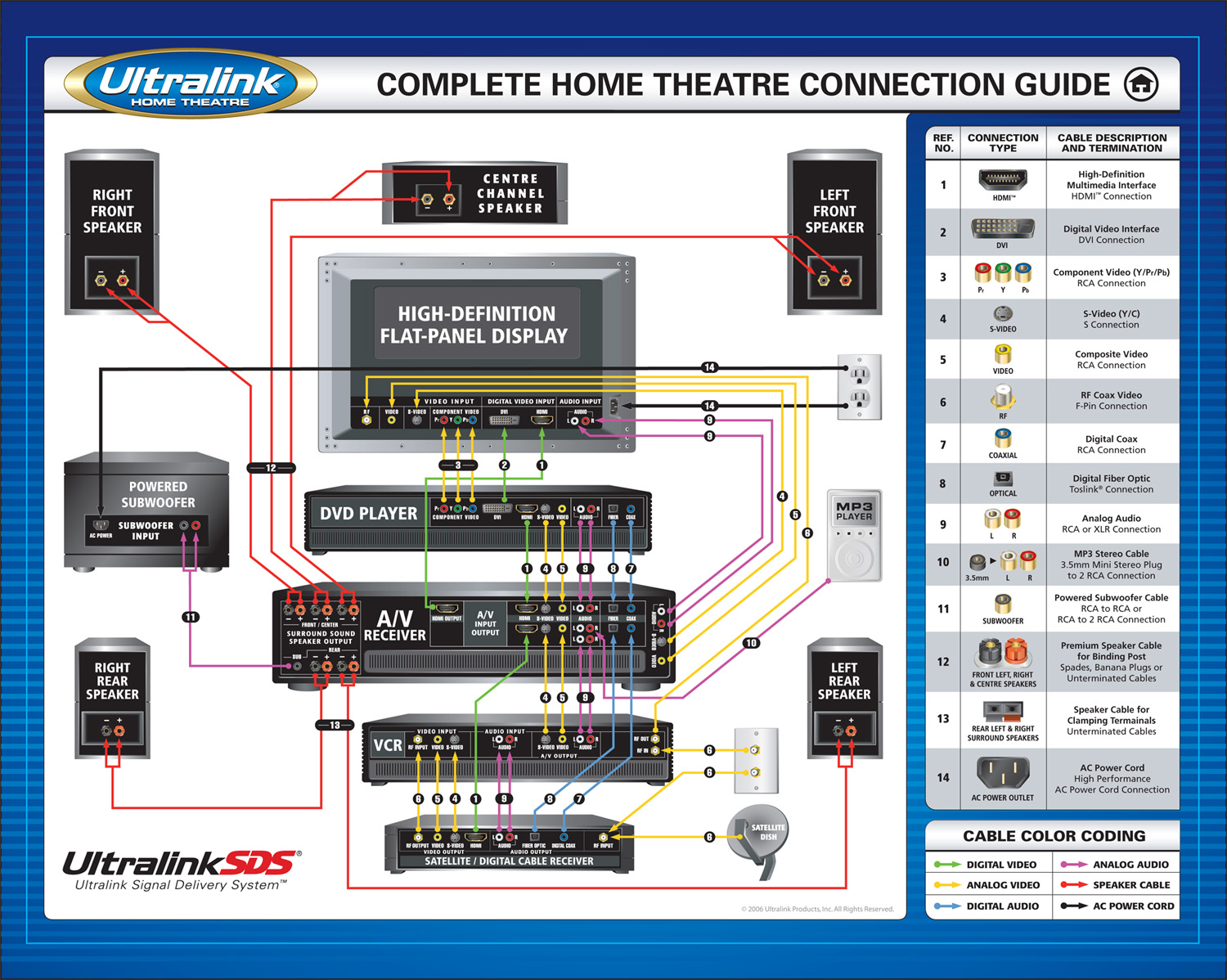
My first question though would be, why are you connecting the TV to the receiver? Optimally, you should be connecting the source (cable box, gaming box, blu ray etc.) directly to the receiver. You can skip the TV entirely when it comes to sound, if you are always going to use the receiver for audio.
If it's necessary to connect TV to receiver, the other 'best' option is optical, last option is RCA jacks.
^^^^^
This
|
Special-Fred
 Title: Sultan of Spank
Posts:
Title: Sultan of Spank
Posts: 245
Registered: 2003-7-30 16:12:04
|
Date Posted:
1/1/00 12:00am
Subject:
Home Theater Guru's, HALP!!
|
An issue i had before was that the surround sound reciever only had an hdmi out, and couldn't take audio through it no matter what. I had to use an optical cable in order to get it to work
-----signature-----
|
|
|
Date Posted:
1/1/00 12:00am
Subject:
Home Theater Guru's, HALP!!
|
my reciever has to be turned on to pass audio through it.
i dont see a need to sit and watch the evening news in full blown 7.1 surround.
when i had cable, i used hdmi from the box to the tv, which also carried audio, and an optical to the reciever so i could crank movies and football games in full blown 7.1.
my ps3 is set up the same way. hdmi to the tv for video and optical to the reciever. now adays, post cable, my htpc is also set up that way
-----signature-----
Jesus? No, but there is indeed a god shaped hole in the heart of man, why is yours so empty? -- snarf igraine
the original monotheism: http://en.wikipedia.org/wiki/Phallus
|
Sansfear
Posts: 757
Registered: 2008-8-31 05:04:52
|
Date Posted:
1/1/00 12:00am
Subject:
Home Theater Guru's, HALP!!
|
|
If you are going to keep a receiver for awhile, you might want to consider one with multiple HDMI inputs. That way as you add additional pieces to your home theater you won't have to deal with issues like this down the road.
That way you can plug 3/4/5 HDMI devices into the receiver and just have one HDMI out to the TV and easily switch among the various inputs.
|
GrilledCheez
Title: The Lord's Balls
Posts: 1,060
Registered: 2006-3-22 11:06:32
|
Date Posted:
1/1/00 12:00am
Subject:
Home Theater Guru's, HALP!!
|
Your TV might have a setting for audio out in a menu. mine does. Just set it to your jacks from your speakers. The type of coax you need for sound isn't the same as the coax you use for cable. You need a special cable with special ends on it if it hooks to your video in jack it isn't the right cable.
I didn't read everything so if you already got this answer, sorry. I have mine setup exactly like you, because I have four devices hooked to my bigscreen, so I don't have enough inputs to hook them all to my receiver. Good Luck.
-----signature-----
Another word for expensive is successful.
|




