| Author |
Topic:
Home Theater Guru's, HALP!!
[Locked] |
|
|
Date Posted:
1/1/00 12:00am
Subject:
Home Theater Guru's, HALP!!
|
I'm trying to get my TV to play sound through my new receiver and HDMI doesn't seem to output from the TV (laptop to receiver HDMI works). Both the TV and the amp have a co-ax jack, so I bought a cord but it doesn't fit anywhere! It screws into the RF-IN (antenna?)slot on the TV, so I'm just going to take a wild guess and assume it's the wrong cord. What cord will work? Or is there a way to get the HDMI to output that I don't know about?
FML, technology never used to be this complicated before. 
-----signature-----
"Goddammit, Swearengen, I don't trust you as far as I could th'ow you, but I enjoy the way you lie."
I don't typo often, but when I do, I blame Swype.
|
Taliesihne
 Title: Wind on the Deep Waters
Posts:
Title: Wind on the Deep Waters
Posts: 1,117
Registered: 2004-2-19 04:47:59
|
Date Posted:
1/1/00 12:00am
Subject:
Home Theater Guru's, HALP!!
|
TV's usually have an audio out jack. Run that wire (cause it could be in a few different types) to the input jack on your receiver.
Or run the audio out from each separate peripheral to the receiver.
-----signature-----
Jesus saves, Allah protects, and Cthulhu thinks you'd make a nice sandwich
First comes smiles, then lies. Last is gunfire. -Roland Deschain, of Gilead
|
Kjarhall
 Title: The Pungent One
Posts:
Title: The Pungent One
Posts: 915
Registered: 2002-3-1 15:47:21
|
Date Posted:
1/1/00 12:00am
Subject:
Home Theater Guru's, HALP!!
|
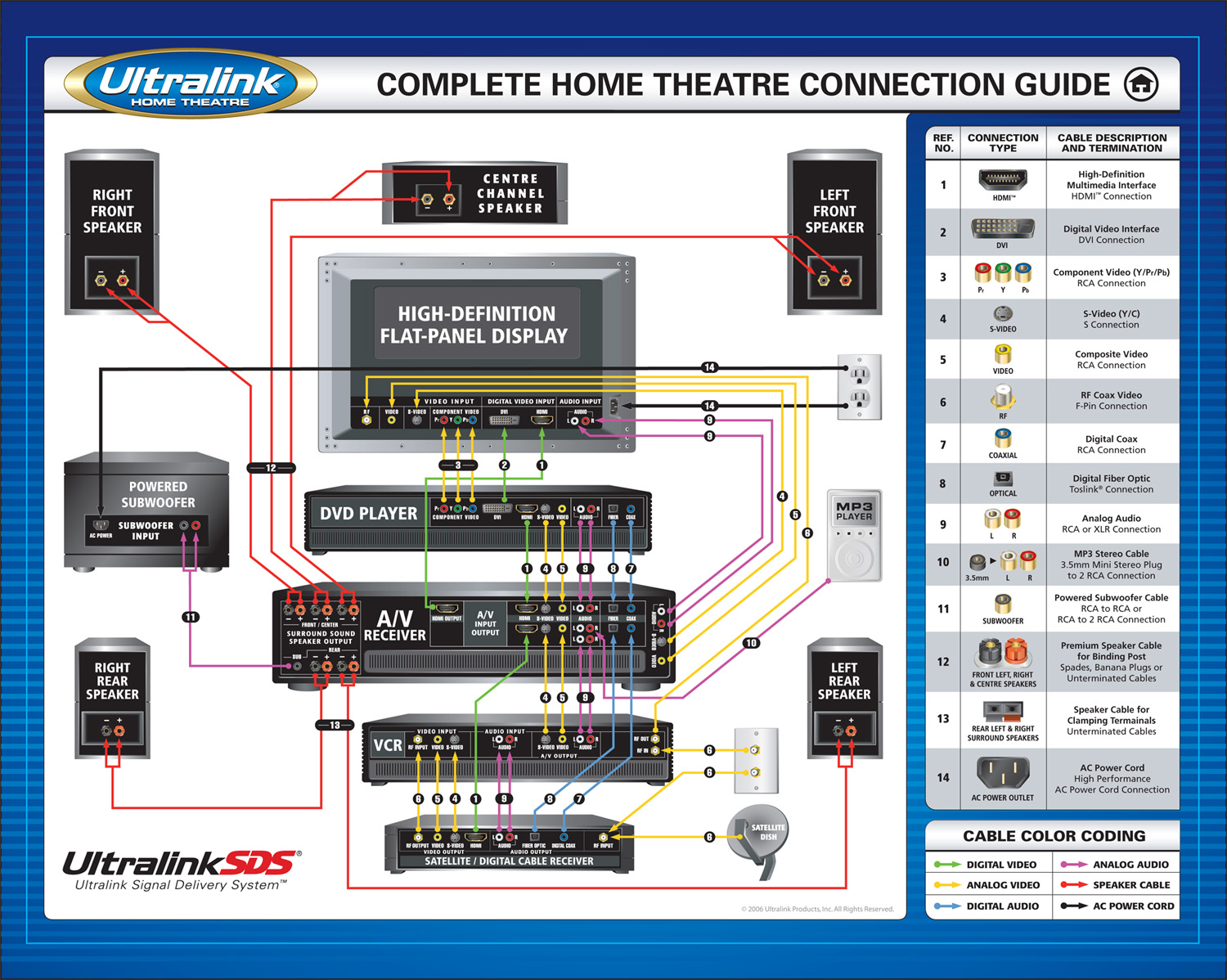
My first question though would be, why are you connecting the TV to the receiver? Optimally, you should be connecting the source (cable box, gaming box, blu ray etc.) directly to the receiver. You can skip the TV entirely when it comes to sound, if you are always going to use the receiver for audio.
If it's necessary to connect TV to receiver, the other 'best' option is optical, last option is RCA jacks.
-----signature-----
You're a crazy moron*
*http://vnboards.ign.com/outpost/b22180/115147923/r115151508/
hah! true story tho i'm a woman an i even love boobs..how can you not??- HallowEve
|
|
|
Date Posted:
1/1/00 12:00am
Subject:
Home Theater Guru's, HALP!!
|
I have 3 HDMI slots, an RF-IN, a coax, and then the headphone and PC audio jacks.
I don't see any outputs.
-----signature-----
"Goddammit, Swearengen, I don't trust you as far as I could th'ow you, but I enjoy the way you lie."
I don't typo often, but when I do, I blame Swype.
|
|
|
Date Posted:
1/1/00 12:00am
Subject:
Home Theater Guru's, HALP!!
|
My sources are my laptop (one HDMI slot, so that goes to the TV) and the Xbox, which is old and only has the component. The video-audio split is too short for me to plug into both the TV and the receiver. The receiver does not have an video converter, so I don't think I can plug them into it and then into the TV.
edit: plus, I bought a 25ft HDMI cable to plug into my laptop across the room. The idea being I can put a movie/tv show on from the laptop to the TV and browse the internet/write from a distance.
-----signature-----
"Goddammit, Swearengen, I don't trust you as far as I could th'ow you, but I enjoy the way you lie."
I don't typo often, but when I do, I blame Swype.
|
Kjarhall
Title: The Pungent One
Posts: 915
Registered: 2002-3-1 15:47:21
|
Date Posted:
1/1/00 12:00am
Subject:
Home Theater Guru's, HALP!!
|
There should be something that says Audio Output, with a red jack and a white jack.
-----signature-----
You're a crazy moron*
*http://vnboards.ign.com/outpost/b22180/115147923/r115151508/
hah! true story tho i'm a woman an i even love boobs..how can you not??- HallowEve
|
Kjarhall
Title: The Pungent One
Posts: 915
Registered: 2002-3-1 15:47:21
|
Date Posted:
1/1/00 12:00am
Subject:
Home Theater Guru's, HALP!!
|
Altra_Shadowstalker posted:
My sources are my laptop (one HDMI slot, so that goes to the TV) and the Xbox, which is old and only has the component. The video-audio split is too short for me to plug into both the TV and the receiver. The receiver does not have an video converter, so I don't think I can plug them into it and then into the TV.
You can use the HDMI plugs for sound only, if the receiver does not throughput video, and use component video cables for the picture.
-----signature-----
You're a crazy moron*
*http://vnboards.ign.com/outpost/b22180/115147923/r115151508/
hah! true story tho i'm a woman an i even love boobs..how can you not??- HallowEve
|
|
|
Date Posted:
1/1/00 12:00am
Subject:
Home Theater Guru's, HALP!!
|
Kjarhall posted:
Altra_Shadowstalker posted:
My sources are my laptop (one HDMI slot, so that goes to the TV) and the Xbox, which is old and only has the component. The video-audio split is too short for me to plug into both the TV and the receiver. The receiver does not have an video converter, so I don't think I can plug them into it and then into the TV.
You can use the HDMI plugs for sound only, if the receiver does not throughput video, and use component video cables for the picture.
I'm not sure I understand. The xbox is an old model and does not have HDMI. I'm not too worried about the xbox right now, I think I'm going to buy a new model anyway when I get my tax return.
The laptop has only one HDMI slot, otherwise I would hook one to the TV and one to the receiver (video/audio respectively). I guess worst case scenario is I could hook up the laptop to the TV via the monitor plug and then use it's HDMI for the receiver. But that's yet another cord (clumsy too) that would have to go across the room.
Is there no way to get sound output from the TV?
-----signature-----
"Goddammit, Swearengen, I don't trust you as far as I could th'ow you, but I enjoy the way you lie."
I don't typo often, but when I do, I blame Swype.
|
Kjarhall
Title: The Pungent One
Posts: 915
Registered: 2002-3-1 15:47:21
|
Date Posted:
1/1/00 12:00am
Subject:
Home Theater Guru's, HALP!!
|
Do you have the TV and reciever model #'s?
Just want to see the set-up.
Usually, you'd have the TV connected via HDMI input to the Receiver HDMI output, and then everything else runs through the receiver. So you'd plug the laptop into the receiver via HDMI and be done, and you'd have one more component that you could connect via HDMI to the receiver. (see chart)
An old Xbox would be component cables for video, connected to the TV and optical for audio, to the receiver.
But if you're saying that won't work, i'd need to look at the connection charts for the TV and receiver.
-----signature-----
You're a crazy moron*
*http://vnboards.ign.com/outpost/b22180/115147923/r115151508/
hah! true story tho i'm a woman an i even love boobs..how can you not??- HallowEve
|
Koneg
Title: Evil Genius
Posts: 894
Registered: 2001-12-4 15:31:28
|
Date Posted:
1/1/00 12:00am
Subject:
Home Theater Guru's, HALP!!
|
Altra_Shadowstalker posted:
My sources are my laptop (one HDMI slot, so that goes to the TV) and the Xbox, which is old and only has the component.
Then your audio sources are the Xbox and the laptop - not the TV.
Laptop to receiver via HDMI, Xbox to receiver via component or more likely RCA (does XBox have optical?) Edit: And as far as I know you can't daisy-chain the HDMI through the TV to the receiver.
Edit Edit: Apparently you can, but it would appear that you have to connect from the laptop to the receiver and then to the TV. If your receiver has multiple HDMI you should be able to do it? Maybe?
-----signature-----
* First rule of a gun fight: Have a gun.
|
"Any sufficiently advanced idiocy is
indistinguishable from trolling." -- Arthur C Clarke
|




