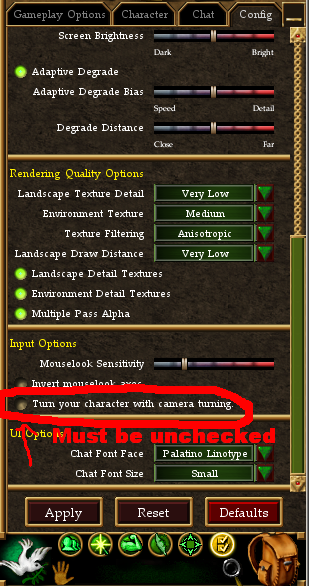
agnari posted:
some simple questions:
1) under profiles tab, is enable auto-nav checked?
2) under Route tab, which of the four types was selected for the nav-route when you built it Cirular, Linear, Follow, or Once?
3) does vtank stay running, or does it almost immediately turn itself off(as in no wand listed in the items tab).
and finally,
4) why wasn't a decal export posted?
answers and POSTING of these may help folks ascertain why you are having troubles. (i run win7 home edition and have auto-nave working).
I've tried it with and without auto nav. Right now, yes, it is.
I've tried every type of route. Right now, Its on linear.
vtank never turns itself off. Its always on, it just wont move unless I push my character forward a hair, then, it stops at the start of the next waypoint and I have to "push" him again.
Combat works fine, buffing works fine. Everything works but the movement on routes.
I honestly didn't even think about doing an export. Here it is if it will help.
Thanks again
Decal (DenAgent.exe) version: 2.9.6.0
type, enabled, name, version, clsid
Plugins, 0, LifeTank X, 11.9.0.9, {910C0F8E-827A-4E35-A980-50D57D0B1296}
Plugins, 0, Corpse Tracker, 1.0.1.2, {B45EF4AD-0D1B-4D74-AA4C-D0CC3045C619}
Plugins, 0, Virindi Integrator2 Beta, 1.0.1.2, {7882AE88-CB68-4C98-BB94-90204C2D2156}
Plugins, 1, AC+, 2.0.0.2082, {5ACB7319-8E15-4A4A-A24D-59180DA1DF49}
Plugins, 1, Virindi HUDs, 1.0.0.8, {C6B1DF06-FF20-459E-8302-AA346CBFDA01}
Plugins, 1, Alinco3, 1.0.1.9, {ED1645F2-7BE3-44C0-8677-F64252F79309}
Plugins, 1, Virindi Tank, 0.3.1.62, {642F1F48-16BE-48BF-B1D4-286652C4533E}
Plugins, 1, Virindi Item Tool, 1.0.0.7, {7BCA75A3-CC65-456B-BBB1-6383FB072B60}
Plugins, 0, Virindi Reporter, 0.0.0.7, {8C70FF56-0E53-4265-9E19-C4534A8D3AA8}
Plugins, 1, Virindi Hotkey System, 1.0.0.4, {ED7CC818-7159-461F-A833-4CA49E1C85B6}
Plugins, 1, Decal Hotkey System, 2.9.6.0, {6B6B9FA8-37DE-4FA3-8C60-52BD6A2F9855}
Plugins, 0, Find It!, 2.9.7.0, {70DD5EF7-FE29-46C3-B0B3-4185327A35F1}
Plugins, 0, Virindi Chat System 5, 5.0.0.4, {0A7B25AC-79A9-4F6A-9751-419B87A7BB05}
Network Filters, 1, Virindi AutomaticUpdatesFilter, 1.0.0.6, {108ED493-48AD-42A6-AADC-EF773E4F185A}
Network Filters, 1, Echo Filter 2, 2.9.6.0, {34239EAD-6317-4C40-A405-193BA5232DD8}
Network Filters, 1, Character Stats Filter, 2.9.6.0, {4540C969-08D1-46BF-97AD-6B19D3C10BEE}
Network Filters, 1, World Object Filter, 2.9.6.0, {53092D1B-F0B0-46FF-BF11-8F031EC9B137}
Network Filters, 1, Decal FileService, 2.9.6.0, {5E9B2FC3-C251-4589-8CE3-2BCA542B98B6}
Network Filters, 1, Identify Queue Filter, 2.9.6.0, {B0C05A9A-273D-4BC4-B7BA-E27CF94C8EF4}
Network Filters, 1, SpellFilter, 2.9.6.0, {C2D43735-BE7E-4829-AF73-F2E7E820EB16}
Network Filters, 1, Darkside Filter, 11.9.0.9, {F93FD48F-BA68-4BF5-A7B3-7908D1634331}
Services, 1, Decal .NET Lifetime Service, 2.9.6.0, {71A69713-6593-47EC-0001-0000000DECA1}
Services, 1, Decal Dat Service, 2.9.6.0, {37B083F0-276E-43AD-8D26-3F7449B519DC}
Services, 1, Decal Render Service, 2.9.6.0, {FB3C8286-88ED-4B4D-B413-94B40F346239}
Services, 1, Decal Inject Gateway Service, 2.9.6.0, {FEFE5CAB-10E4-404F-AD4D-184BCB506099}
Services, 1, Decal Input Service, 2.9.6.0, {B33307BA-706D-474A-80B9-70BB8D13EF3E}
Services, 1, Decal Networking Service, 2.9.6.1, {C8C406F8-BA2E-4964-8B04-FF38394A8E0E}
Services, 1, Virindi View Service Bootstrapper, 99.99.99.99, {DBAC9286-B38D-4570-961F-D4D9349AE3D4}
Services, 1, Decal D3DService, 2.9.6.0, {F0CC07A0-2C89-4FA4-9356-714665BC2F8B}
Surrogates, 1, Decal.Adapter Surrogate, 2.9.6.0, {71A69713-6593-47EC-0002-0000000DECA1}
Surrogates, 1, Prefilter Network Filter Surrogate, 2.9.6.0, {443D4A68-5422-4E0C-9460-973F8FBDB190}
Surrogates, 1, ActiveX Plugin Surrogate, 2.9.6.0, {7559F22F-C56F-4621-AE08-9C354D799D4B}
Surrogates, -1, Version 1 Plugin Surrogate, 2.9.6.0, {3D837F6E-B5CA-4604-885F-7AB45FCFA62A}
Input Actions, 1, Delay Input Action, 2.9.6.0, {324D76B8-D8C7-4A81-B867-E4E1F874E488}
Input Actions, 1, Mouse Move Input Action, 2.9.6.0, {57D18578-0BF0-4DE5-A0A9-E7CB531C0429}
Input Actions, 1, Restore Input Action, 2.9.6.0, {6EE2F682-7129-44BE-84B9-787BAE35EC1C}
Input Actions, 1, Polled Delay Input Action, 2.9.6.0, {762335B2-2274-4BB4-8B1F-F7286C949FF7}
Input Actions, 1, Typing Input Action, 2.9.6.0, {9CDCEEDC-F8AC-42D5-9A05-52B9346D00A4}
Input Actions, 1, Event Input Action, 2.9.6.0, {D6E4BD19-4900-4515-BCE2-A9EA4AAE2699}
Operating System:
Home Edition (Build 7600)
[Protected Storage Service] : Manual
Decal Settings
[Injection Method] : Timer (Default)
[Portal Path] : C:\Program Files (x86)\Turbine\Asheron's Call
[Launcher App] : acclient.exe
[Update URL] :
http://update.decaldev.com
[memlocs.xml] : 26272 bytes, Version 0.0.11.4017
[messages.xml] : 54632 bytes, Version 2010.12.17.0
[Video Memory] : -26230784
D3DX Libraries (Only d3dx9_30 is required)
[d3dx9_24.dll] : Installed (9.5.132.0)
[d3dx9_25.dll] : Installed (9.6.168.0)
[d3dx9_26.dll] : Installed (9.7.239.0)
[d3dx9_27.dll] : Installed (9.8.299.0)
[d3dx9_28.dll] : Installed (9.10.455.0)
[d3dx9_29.dll] : Installed (9.11.519.0)
[d3dx9_30.dll] : Installed (9.12.589.0)
---Support Libraries ---
Note: The following libraries are not necessary for Decal to function and are only provided to be of use to plugin developers.
.NET Frameworks
[v1.0.3705] (1.0 Final) : Not Installed
[v1.1.4322] (1.1 Final) : Installed (Service Pack 1)
[v2.0.50215] (2.0 Beta 2) : Not Installed
[v2.0.50727] (2.0 Final) : Installed (Service Pack 2)
C++ Libraries
[msvbvm60.dll] : Installed (6.0.98.15)
[atl70.dll] : Not Installed
[mfc70.dll] : Not Installed
[msvcr70.dll] : Installed (7.0.9466.0)
[msvcp70.dll] : Installed (7.0.9466.0)
[atl71.dll] : Installed (7.10.3077.0)
[mfc71.dll] : Installed (7.10.3077.0)
[msvcr71.dll] : Installed (7.10.3052.4)
[msvcp71.dll] : Installed (7.10.3077.0)
Microsoft XML Libraries
[msxml3.dll] : Installed (8.110.7600.16605)
[msxml4.dll] : Installed (4.20.9876.0)
---Video Device Information---
[Device] : ATI Radeon HD 5700 Series
[Device Name] : \\.\DISPLAY1
[KeyDeviceID] : Enum\PCI\VEN_1002&DEV_68B8&SUBSYS_25431002&REV_00
[KeyDeviceKey] : \Registry\Machine\System\CurrentControlSet\Control\Video\{60F1A0AD-9875-4CE3-8502-C291BCEF7358}\0000
[Manufacturer] : ATI Technologies Inc.
[ChipType] : ATI display adapter (0x68B8)
[DACType] : Internal DAC(400MHz)
[Revision] :
[MemoryLocalised] : 4070 MB
[MemoryEnglish] : 4070 MB
[DisplayLocalised] : 1440 x 900 (32 bit) (60Hz)
[DisplayEnglish] : 1440 x 900 (32 bit) (60Hz)
[DisplayWidth] : 1440
[DisplayHeight] : 900
[DisplayBpp] : 32
[RefreshRate] : 60
[MonitorName] : Generic Non-PnP Monitor
[MonitorMaxRes] :
[DriverName] : aticfx64.dll,aticfx64.dll,aticfx64.dll,aticfx32,aticfx32,aticfx32,atiumd64.dll,atidxx64.dll,atidxx6
[DriverVersion] : 8.17.0010.0029
[DriverAttributes] : Final Retail
[DriverLangEnglish] : English
[DriverLangLocal] : English
[DriverDateEng] : 5/17/2010 18:06:18
[DriverDateLocal] : 5/17/2010 6:06:18 PM
[DriverSize] : 591872
[MiniVdd] : n/a
[MiniVddDateEng] : n/a
[MiniVddDateLocal] : n/a
[MiniVddSize] : 0
[Vdd] : n/a
[RenderWindow] : Yes
[Beta] : No
[Debug] : No
[Signed] : No
[SignValid] : No
[Identifier] : {D7B71EE2-2BF8-11CF-AF73-4905BEC2C535}
[DDIVer] : 10
[DDIVerEng] : 10.1
[DDIVerLocal] : 10.1
[iAdapter] : 1
[VendorID] : 0x1002
[DeviceID] : 0x68B8
[SubSystemID] : 0x25431002
[RevisionID] : 0x0000
[WHQL Level] : 0
[NoHardware] : 0
[DDAccelEnabled] : Yes
[3DAccelExists] : Yes
[3DAccelEnabled] : Yes
[AGP Enabled] : Yes
[AGPExists] : Yes
[AGPExistsValid] : Yes