


VaultNetwork.net Vault Network Boards
Author Topic: AC Decal Won't Run on W7 64bit [Locked]
ArcTicZer0
Posts: 7
Registered:
I can not run AC Decal on my computer. I've tried numerous fixes and still haven't had any luck.


OS: W7 64-Bit

Graphics: SLI Enabled 2x Nvidia 8800GTX with latest drivers

Asheron's Call installed in C:\Games\Turbine\Asheron's Call\

Decal installed in C:\Games\Decal 3.0\

Decal Plug-ins installed in C:\Games\Decal Plugins\


With no plug-ins installed my game will crash with Decal but will not crash with no decal running. I load the game and starting playing and then suddenly the graphics around my mouse pointer show corrupted graphics. The decal plugin in the upper left-hand corner of my screen start to flicker. I can take screen shots but as soon as I do anything else my computer freezes and I get a blue screen or it just freezes and I have to reboot.


It's hard to see the flicker on the decal shortcut bar in the attached pic. It doesn't show my mouse pointer graphic corruption.
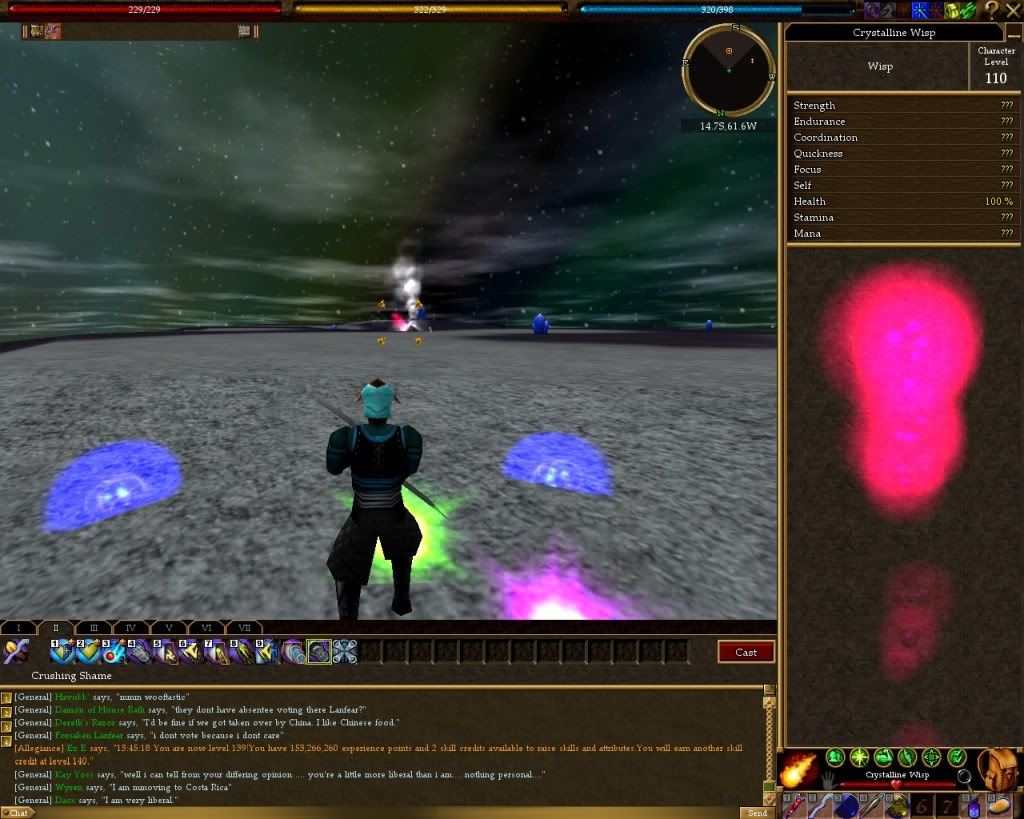


Decal (DenAgent.exe) version: 2.9.6.0


type, enabled, name, version, clsid

Plugins, 1, Decal Hotkey System, 2.9.6.0, {6B6B9FA8-37DE-4FA3-8C60-52BD6A2F9855}

Network Filters, 1, Echo Filter 2, 2.9.6.0, {34239EAD-6317-4C40-A405-193BA5232DD8}

Network Filters, 1, Character Stats Filter, 2.9.6.0, {4540C969-08D1-46BF-97AD-6B19D3C10BEE}

Network Filters, 1, World Object Filter, 2.9.6.0, {53092D1B-F0B0-46FF-BF11-8F031EC9B137}

Network Filters, 1, Decal FileService, 2.9.6.0, {5E9B2FC3-C251-4589-8CE3-2BCA542B98B6}

Network Filters, 1, Identify Queue Filter, 2.9.6.0, {B0C05A9A-273D-4BC4-B7BA-E27CF94C8EF4}

Network Filters, 1, SpellFilter, 2.9.6.0, {C2D43735-BE7E-4829-AF73-F2E7E820EB16}

Services, 1, Decal .NET Lifetime Service, 2.9.6.0, {71A69713-6593-47EC-0001-0000000DECA1}

Services, 1, Decal Dat Service, 2.9.6.0, {37B083F0-276E-43AD-8D26-3F7449B519DC}

Services, 1, Decal Render Service, 2.9.6.0, {FB3C8286-88ED-4B4D-B413-94B40F346239}

Services, 1, Decal Inject Gateway Service, 2.9.6.0, {FEFE5CAB-10E4-404F-AD4D-184BCB506099}

Services, 1, Decal Input Service, 2.9.6.0, {B33307BA-706D-474A-80B9-70BB8D13EF3E}

Services, 1, Decal Networking Service, 2.9.6.1, {C8C406F8-BA2E-4964-8B04-FF38394A8E0E}

Services, 1, Decal D3DService, 2.9.6.0, {F0CC07A0-2C89-4FA4-9356-714665BC2F8B}

Surrogates, 1, Decal.Adapter Surrogate, 2.9.6.0, {71A69713-6593-47EC-0002-0000000DECA1}

Surrogates, 1, Prefilter Network Filter Surrogate, 2.9.6.0, {443D4A68-5422-4E0C-9460-973F8FBDB190}

Surrogates, 1, ActiveX Plugin Surrogate, 2.9.6.0, {7559F22F-C56F-4621-AE08-9C354D799D4B}

Surrogates, -1, Version 1 Plugin Surrogate, 2.9.6.0, {3D837F6E-B5CA-4604-885F-7AB45FCFA62A}

Input Actions, 1, Delay Input Action, 2.9.6.0, {324D76B8-D8C7-4A81-B867-E4E1F874E488}

Input Actions, 1, Mouse Move Input Action, 2.9.6.0, {57D18578-0BF0-4DE5-A0A9-E7CB531C0429}

Input Actions, 1, Restore Input Action, 2.9.6.0, {6EE2F682-7129-44BE-84B9-787BAE35EC1C}

Input Actions, 1, Polled Delay Input Action, 2.9.6.0, {762335B2-2274-4BB4-8B1F-F7286C949FF7}

Input Actions, 1, Typing Input Action, 2.9.6.0, {9CDCEEDC-F8AC-42D5-9A05-52B9346D00A4}

Input Actions, 1, Event Input Action, 2.9.6.0, {D6E4BD19-4900-4515-BCE2-A9EA4AAE2699}


Operating System:

Home Edition (Build 7600)


[Protected Storage Service] : Manual


Decal Settings

[Injection Method] : Timer (Default)

[Portal Path] : C:\Games\Turbine\Asheron's Call

[Launcher App] : acclient.exe

[Update URL] : http://update.decaldev.com

[memlocs.xml] : 25656 bytes, Version 0.0.11.4000

[messages.xml] : 54173 bytes, Version 2008.04.15.1

[Video Memory] : -1641590784


D3DX Libraries (Only d3dx9_30 is required)

[d3dx9_24.dll] : Installed (9.5.132.0)

[d3dx9_25.dll] : Installed (9.6.168.0)

[d3dx9_26.dll] : Installed (9.7.239.0)

[d3dx9_27.dll] : Installed (9.8.299.0)

[d3dx9_28.dll] : Installed (9.10.455.0)

[d3dx9_29.dll] : Installed (9.11.519.0)

[d3dx9_30.dll] : Installed (9.12.589.0)


---Support Libraries ---

Note: The following libraries are not necessary for Decal to function and are only provided to be of use to plugin developers.


.NET Frameworks

[v1.0.3705] (1.0 Final) : Not Installed

[v1.1.4322] (1.1 Final) : Installed

[v2.0.50215] (2.0 Beta 2) : Not Installed

[v2.0.50727] (2.0 Final) : Installed (Service Pack 2)


C++ Libraries

[msvbvm60.dll] : Installed (6.0.98.15)

[atl70.dll] : Not Installed

[mfc70.dll] : Not Installed

[msvcr70.dll] : Not Installed

[msvcp70.dll] : Not Installed

[atl71.dll] : Not Installed

[mfc71.dll] : Not Installed

[msvcr71.dll] : Not Installed

[msvcp71.dll] : Not Installed


Microsoft XML Libraries

[msxml3.dll] : Installed (8.110.7600.16605)

[msxml4.dll] : Installed (4.30.2107.0)


---Video Device Information---

[Device] : NVIDIA GeForce 8800 GTX

[Device Name] : \\.\DISPLAY1

[KeyDeviceID] : Enum\PCI\VEN_10DE&DEV_0191&SUBSYS_C8313842&REV_A2

[KeyDeviceKey] : \Registry\Machine\System\CurrentControlSet\Control\Video\{A9135A4C-4793-4DF6-AC45-D6DC7EEA46F8}\0000

[Manufacturer] : NVIDIA

[ChipType] : GeForce 8800 GTX

[DACType] : Integrated RAMDAC

[Revision] :

[MemoryLocalised] : 2530 MB

[MemoryEnglish] : 2530 MB

[DisplayLocalised] : 1280 x 1024 (32 bit) (75Hz)

[DisplayEnglish] : 1280 x 1024 (32 bit) (75Hz)

[DisplayWidth] : 1280

[DisplayHeight] : 1024

[DisplayBpp] : 32

[RefreshRate] : 75

[MonitorName] : Generic PnP Monitor

[MonitorMaxRes] :

[DriverName] : nvd3dumx.dll,nvwgf2umx.dll,nvwgf2umx.dll,nvd3dum,nvwgf2um,nvwgf2um

[DriverVersion] : 8.17.0012.6089

[DriverAttributes] : Final Retail

[DriverLangEnglish] : English

[DriverLangLocal] : English

[DriverDateEng] : 10/8/2010 04:47:00

[DriverDateLocal] : 10/8/2010 4:47:00 AM

[DriverSize] : 12787816

[MiniVdd] : n/a

[MiniVddDateEng] : n/a

[MiniVddDateLocal] : n/a

[MiniVddSize] : 0

[Vdd] : n/a

[RenderWindow] : Yes

[Beta] : No

[Debug] : No

[Signed] : No

[SignValid] : No

[Identifier] : {D7B71E3E-42D1-11CF-3B4C-3DE81CC2C535}

[DDIVer] : 10

[DDIVerEng] : 10

[DDIVerLocal] : 10

[iAdapter] : 0

[VendorID] : 0x10DE

[DeviceID] : 0x0191

[SubSystemID] : 0xC8313842

[RevisionID] : 0x00A2

[WHQL Level] : 0

[NoHardware] : 0

[DDAccelEnabled] : Yes

[3DAccelExists] : Yes

[3DAccelEnabled] : Yes

[AGP Enabled] : Yes

[AGPExists] : Yes

[AGPExistsValid] : Yes


Thanks!
Ball-Cruncher  3 stars
Posts: 717
Registered: 2004-8-28 14:15:47
Did you follow the steps in the thread that is stickied at the top of this page, in the order that it says to?


-----signature-----
T C M
In-Game as Bluballz or Vash
Maglett_of_FF  2 stars
Posts: 332
Registered: 2002-5-17 22:53:12
"Graphics: SLI Enabled 2x Nvidia 8800GTX with latest drivers "

I suspect THERE'S your problem..... Specifically the SLI part.
IIRC AC does NOT 'like' SLI.

It *IS* quite possible to have AC, Decal and ACDC working on Win7 x64, however I do recall hearing AC has an issue with multiple graphics cards....


-----signature-----
Edits are for spelling :^)
Trophy Compendium http://vnboards.ign.com/message.asp?topic=90389010
/a Devil's Saint says, "what we teach our Children we become" June 3, 2008
ArcTicZer0
Posts: 7
Registered:
I followed the procedures listed in the sticky above. I went back and installed .NET 1.0 .NET 1.1, VB Runtimes, msxml 3.0. I reinstalled Direct 9.0c. Everything else was installed or not compatible.


It ran fine for one night with no plugins. I tried it again today and it died 5 min into playing with the same symptoms.


New Export:


Decal (DenAgent.exe) version: 2.9.6.0


type, enabled, name, version, clsid

Plugins, 1, Decal Hotkey System, 2.9.6.0, {6B6B9FA8-37DE-4FA3-8C60-52BD6A2F9855}

Network Filters, 1, Echo Filter 2, 2.9.6.0, {34239EAD-6317-4C40-A405-193BA5232DD8}

Network Filters, 1, Character Stats Filter, 2.9.6.0, {4540C969-08D1-46BF-97AD-6B19D3C10BEE}

Network Filters, 1, World Object Filter, 2.9.6.0, {53092D1B-F0B0-46FF-BF11-8F031EC9B137}

Network Filters, 1, Decal FileService, 2.9.6.0, {5E9B2FC3-C251-4589-8CE3-2BCA542B98B6}

Network Filters, 1, Identify Queue Filter, 2.9.6.0, {B0C05A9A-273D-4BC4-B7BA-E27CF94C8EF4}

Network Filters, 1, SpellFilter, 2.9.6.0, {C2D43735-BE7E-4829-AF73-F2E7E820EB16}

Services, 1, Decal .NET Lifetime Service, 2.9.6.0, {71A69713-6593-47EC-0001-0000000DECA1}

Services, 1, Decal Dat Service, 2.9.6.0, {37B083F0-276E-43AD-8D26-3F7449B519DC}

Services, 1, Decal Render Service, 2.9.6.0, {FB3C8286-88ED-4B4D-B413-94B40F346239}

Services, 1, Decal Inject Gateway Service, 2.9.6.0, {FEFE5CAB-10E4-404F-AD4D-184BCB506099}

Services, 1, Decal Input Service, 2.9.6.0, {B33307BA-706D-474A-80B9-70BB8D13EF3E}

Services, 1, Decal Networking Service, 2.9.6.1, {C8C406F8-BA2E-4964-8B04-FF38394A8E0E}

Services, 1, Decal D3DService, 2.9.6.0, {F0CC07A0-2C89-4FA4-9356-714665BC2F8B}

Surrogates, 1, Decal.Adapter Surrogate, 2.9.6.0, {71A69713-6593-47EC-0002-0000000DECA1}

Surrogates, 1, Prefilter Network Filter Surrogate, 2.9.6.0, {443D4A68-5422-4E0C-9460-973F8FBDB190}

Surrogates, 1, ActiveX Plugin Surrogate, 2.9.6.0, {7559F22F-C56F-4621-AE08-9C354D799D4B}

Surrogates, -1, Version 1 Plugin Surrogate, 2.9.6.0, {3D837F6E-B5CA-4604-885F-7AB45FCFA62A}

Input Actions, 1, Delay Input Action, 2.9.6.0, {324D76B8-D8C7-4A81-B867-E4E1F874E488}

Input Actions, 1, Mouse Move Input Action, 2.9.6.0, {57D18578-0BF0-4DE5-A0A9-E7CB531C0429}

Input Actions, 1, Restore Input Action, 2.9.6.0, {6EE2F682-7129-44BE-84B9-787BAE35EC1C}

Input Actions, 1, Polled Delay Input Action, 2.9.6.0, {762335B2-2274-4BB4-8B1F-F7286C949FF7}

Input Actions, 1, Typing Input Action, 2.9.6.0, {9CDCEEDC-F8AC-42D5-9A05-52B9346D00A4}

Input Actions, 1, Event Input Action, 2.9.6.0, {D6E4BD19-4900-4515-BCE2-A9EA4AAE2699}


Operating System:

Home Edition (Build 7600)


[Protected Storage Service] : Manual


Decal Settings

[Injection Method] : Timer (Default)

[Portal Path] : C:\Games\Turbine\Asheron's Call

[Launcher App] : acclient.exe

[Update URL] : http://update.decaldev.com

[memlocs.xml] : 25656 bytes, Version 0.0.11.4000

[messages.xml] : 54173 bytes, Version 2008.04.15.1

[Video Memory] : -1641590784


D3DX Libraries (Only d3dx9_30 is required)

[d3dx9_24.dll] : Installed (9.5.132.0)

[d3dx9_25.dll] : Installed (9.6.168.0)

[d3dx9_26.dll] : Installed (9.7.239.0)

[d3dx9_27.dll] : Installed (9.8.299.0)

[d3dx9_28.dll] : Installed (9.10.455.0)

[d3dx9_29.dll] : Installed (9.11.519.0)

[d3dx9_30.dll] : Installed (9.12.589.0)


---Support Libraries ---

Note: The following libraries are not necessary for Decal to function and are only provided to be of use to plugin developers.


.NET Frameworks

[v1.0.3705] (1.0 Final) : Not Installed

[v1.1.4322] (1.1 Final) : Installed (Service Pack 1)

[v2.0.50215] (2.0 Beta 2) : Not Installed

[v2.0.50727] (2.0 Final) : Installed (Service Pack 2)


C++ Libraries

[msvbvm60.dll] : Installed (6.0.98.15)

[atl70.dll] : Not Installed

[mfc70.dll] : Not Installed

[msvcr70.dll] : Not Installed

[msvcp70.dll] : Not Installed

[atl71.dll] : Not Installed

[mfc71.dll] : Not Installed

[msvcr71.dll] : Not Installed

[msvcp71.dll] : Not Installed


Microsoft XML Libraries

[msxml3.dll] : Installed (8.110.7600.16605)

[msxml4.dll] : Installed (4.30.2107.0)


---Video Device Information---

[Device] : NVIDIA GeForce 8800 GTX

[Device Name] : \\.\DISPLAY1

[KeyDeviceID] : Enum\PCI\VEN_10DE&DEV_0191&SUBSYS_C8313842&REV_A2

[KeyDeviceKey] : \Registry\Machine\System\CurrentControlSet\Control\Video\{A9135A4C-4793-4DF6-AC45-D6DC7EEA46F8}\0000

[Manufacturer] : NVIDIA

[ChipType] : GeForce 8800 GTX

[DACType] : Integrated RAMDAC

[Revision] :

[MemoryLocalised] : 2530 MB

[MemoryEnglish] : 2530 MB

[DisplayLocalised] : 1280 x 1024 (32 bit) (75Hz)

[DisplayEnglish] : 1280 x 1024 (32 bit) (75Hz)

[DisplayWidth] : 1280

[DisplayHeight] : 1024

[DisplayBpp] : 32

[RefreshRate] : 75

[MonitorName] : Generic PnP Monitor

[MonitorMaxRes] :

[DriverName] : nvd3dumx.dll,nvwgf2umx.dll,nvwgf2umx.dll,nvd3dum,nvwgf2um,nvwgf2um

[DriverVersion] : 8.17.0012.6089

[DriverAttributes] : Final Retail

[DriverLangEnglish] : English

[DriverLangLocal] : English

[DriverDateEng] : 10/8/2010 04:47:00

[DriverDateLocal] : 10/8/2010 4:47:00 AM

[DriverSize] : 12787816

[MiniVdd] : n/a

[MiniVddDateEng] : n/a

[MiniVddDateLocal] : n/a

[MiniVddSize] : 0

[Vdd] : n/a

[RenderWindow] : Yes

[Beta] : No

[Debug] : No

[Signed] : No

[SignValid] : No

[Identifier] : {D7B71E3E-42D1-11CF-3B4C-3DE81CC2C535}

[DDIVer] : 10

[DDIVerEng] : 10

[DDIVerLocal] : 10

[iAdapter] : 0

[VendorID] : 0x10DE

[DeviceID] : 0x0191

[SubSystemID] : 0xC8313842

[RevisionID] : 0x00A2

[WHQL Level] : 0

[NoHardware] : 0

[DDAccelEnabled] : Yes

[3DAccelExists] : Yes

[3DAccelEnabled] : Yes

[AGP Enabled] : Yes

[AGPExists] : Yes

[AGPExistsValid] : Yes
ArcTicZer0
Posts: 7
Registered:
Maglett_of_FF posted:

"Graphics: SLI Enabled 2x Nvidia 8800GTX with latest drivers "


I suspect THERE'S your problem..... Specifically the SLI part.

IIRC AC does NOT 'like' SLI.


It *IS* quite possible to have AC, Decal and ACDC working on Win7 x64, however I do recall hearing AC has an issue with multiple graphics cards....


I'll try running it without SLI enabled and with no plugins and see what happens.
Ball-Cruncher  3 stars
Posts: 717
Registered: 2004-8-28 14:15:47
Just for clarification, in the sticky at the top of the page, if you go down about 4 posts into the thread, there is a step-by-step installation guide. And from what I have seen, it needs to be followed exactly. People that have followed it have zero problems.


-----signature-----
T C M
In-Game as Bluballz or Vash
RoogonII  2 stars
Posts: 343
Registered:
Minor note .. I have the same Win 7 x64 / AC / Decal / ACDC setup on my desktop, running successfully with no problems.


I am running AC/Decal/ACDC under my C:\Games folder.


This is the second Win7x64 I have done this on. My first had Decal installed under ..\Program Files(x86)


(I know this does not answer your question, only to tell you to not give up..)
ArcTicZer0
Posts: 7
Registered:
Ball-Cruncher posted:

Just for clarification, in the sticky at the top of the page, if you go down about 4 posts into the thread, there is a step-by-step installation guide. And from what I have seen, it needs to be followed exactly. People that have followed it have zero problems.


Yes, I have ran through the yaroz_vn install steps twice not. Both with no luck.
ArcTicZer0
Posts: 7
Registered:
Well after two nights of running with just Decal with SLI disabled. I have some wierd problems. I run it fine the first night. I turned off AC and Decal. I put my OS in sleep mode and I went to bed. The next day I launch Decal in Admin mode and I run the update. I then launch AC in Admin mode. I get to the character selection and I try loading my character in and my computer goes to a blue screen with a nvlddmkm.sys error. (Which i didn't notice the first time this happened since the error came and sent so fast.)


I try the same sequence again last night. The game ran with 'ok' with some wierd graphic issues here and there but no blue screen. I even tried doing this...I launched Decal in Admin mode, run Decal update, launch AC in admin mode. log into the game and play for an hour or so. I logged off and shut down AC and Decal. I go back into the game the same way and no bluescreen. So I put my OS in sleep mode for the night.


Today I tried to get into the game and I get the bluescreen with the nvlddmkm.sys error.


I turned back on SLI and I'm about to install the next version of Nvidia Win 64k bit drivers. (Version 260.99) I had 260.89 previously installed on my system.


This almost seems like a decal issue. The game runs fine without Decal.


Well going to try game with new drivers, SLI turned back on, and Decal on with no plugins. Wish me luck.
Ball-Cruncher  3 stars
Posts: 717
Registered: 2004-8-28 14:15:47
Let us know what happens.


Edit: When you put your comp in sleep mode, are you leaving decal and AC running? Also, make sure all your drivers for audio/network cards are updated as well. Audio specifically can mess with AC/decal if not updated.


-----signature-----
T C M
In-Game as Bluballz or Vash

VaultNetwork.net is an independently operated community forum and is not affiliated with, endorsed by, or technically based on IGN, GameSpy, FilePlanet, GameStats, or the former IGN/GameSpy Vault Network.
References to VaultNetwork.net mean this site/domain. VNBoards-style presentation is a visual homage only. By using this site, you agree to the forum rules.